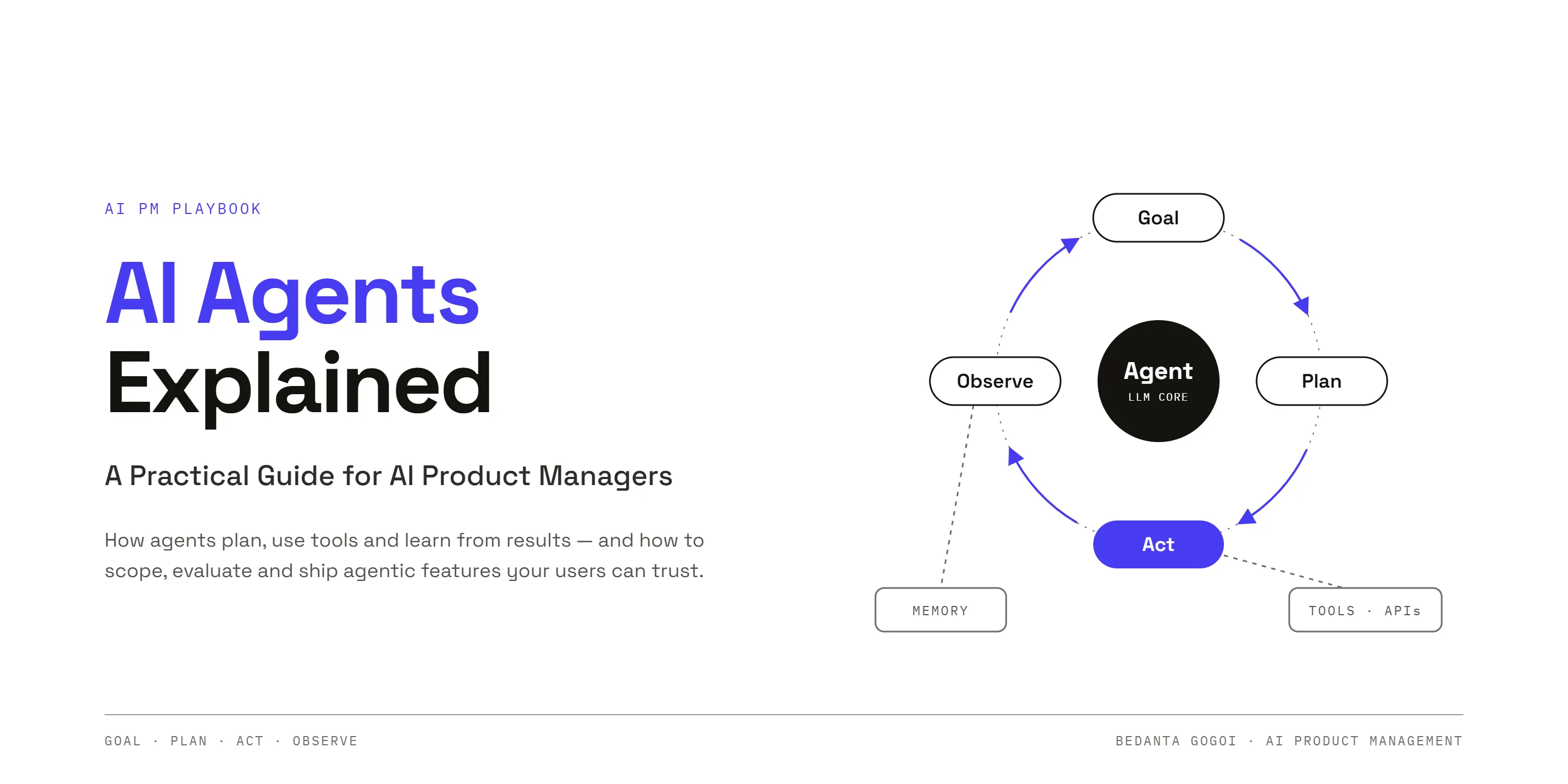
AI agents are becoming an important part of modern AI products. But the term AI agent is often used loosely. Is an agent simply a chatbot with a better interface, or can it actually do work?
For AI Product Managers (AI PMs), understanding this distinction helps identify where an agent product can solve real user problems—and where a simpler solution is enough.
What Is an AI Agent?
An AI agent is a system that uses a model to take actions in an environment to achieve a goal. Unlike a basic chatbot that primarily responds with text, an agent can use tools, work through multiple steps, inspect results, and adjust its approach.
A practical way to understand an agent is to think of it as a system made up of several components:
- Model (the brain): Interprets instructions, reasons about the task, and chooses what to do next.
- Tools: Let the model perform actions, such as searching the web, reading files, querying a database, calling an API, or running code.
- Memory: Stores relevant context so the system can use information from earlier steps or sessions.
- Iteration loop: Allows the agent to plan, act, inspect the result, and try again when necessary.
- Goals: Define the outcome the agent is expected to achieve.
- Permissions: Set boundaries around what the agent can access or change.
- Environment: The place where the agent operates, such as a browser, local machine, application, or remote server.
A model on its own is not necessarily an agent. A capable model without tools may be limited to generating responses; tools, memory, and an action loop make it possible to complete more involved workflows.
AI Agent vs. Chatbot: What Is the Difference?
A chatbot usually handles a prompt and returns a response. An AI agent can take a goal and work through a sequence of actions to make progress toward it.
| Capability | Basic chatbot | AI agent |
|---|---|---|
| Primary output | Text or answers | Answers and actions |
| Tool use | Limited or unavailable | Can use connected tools |
| Multi-step work | Usually guided turn by turn | Can plan and iterate |
| Memory | Often limited to conversation context | May store and retrieve longer-term memory |
| Verification | Usually left to the user | Can inspect results and retry |
| Autonomy | Responds when prompted | May execute a defined workflow within permissions |
For example, a chatbot can explain how to fix a software bug. A coding agent may inspect the code, identify the issue, edit a file, run tests, and check whether the fix worked.
Not every agent has every capability. The actual behavior depends on its tools, memory design, permissions, and execution environment.
Three Common Levels of AI Systems
One useful way to classify these systems is by how much work they can perform and how long they can operate.
1. Chatbots
These systems answer questions and generate content. They are useful for brainstorming, explanations, and drafting, but typically do not execute a complete workflow by themselves.
2. Task-Based Agents
A task agent can use tools to complete a bounded job, such as editing code or analyzing files. Its work may depend on an active session; when the session ends, it may not continue operating.
3. Persistent Agents
A persistent agent can retain selected information between sessions and run in the background when deployed in a suitable environment, such as a remote server or virtual machine. Depending on its setup, it may also respond through messaging tools or run scheduled workflows.
Persistence does not mean unlimited autonomy. The agent still needs clear instructions, appropriate permissions, monitoring, and safeguards.
Why Memory Matters in AI Agents
Memory helps an agent use relevant information beyond the immediate prompt. Different memory approaches serve different purposes:
- Context-window memory: Information available within the current interaction. It is immediate, but the available context is limited.
- Session memory: A summary or record of useful information from a completed session, which can be loaded later.
- Long-term memory: Curated information retained across many sessions, such as stable preferences or important project facts.
- Procedural memory: Reusable instructions or skills for carrying out a task consistently.
More memory is not automatically better. Large or poorly organized context can make it harder to retrieve the right information. AI PMs should consider what needs to be remembered, what should expire, how users can correct stale information, and how sensitive data will be protected.
How the Agent Loop Works
A useful agent workflow often follows a repeating cycle:
- Understand the goal. Translate the user’s request into a clear outcome.
- Plan the next action. Break the work into manageable steps.
- Use a tool. Retrieve information or perform an action.
- Inspect the result. Check whether the action produced useful output.
- Revise and repeat. Try another step if the goal has not been met.
- Stop or ask for help. Finish when the goal is achieved, a limit is reached, or human input is required.
This loop makes agents useful for multi-step tasks. It also creates risks: an agent may repeat actions, use incorrect information, or make unintended changes. Set iteration limits, define stopping conditions, and require human approval for consequential actions.
Someone has to own these controls. An AI agent manager—whether a person, a product role, or a software control layer—defines each agent’s scope and permissions, monitors errors, latency, and cost, keeps logs for review, and retests the agent after updates.
Where AI Product Managers Can Use Agents
AI agents are most valuable when they address a clear user problem—not simply because the technology is available. An AI agent for a product manager should augment product judgment, not replace accountability for product decisions.
Potential use cases include:
- Product discovery: Analyze large collections of app reviews and support tickets to identify recurring pain points. Treat model-generated themes as hypotheses and validate them with users and quantitative data.
- Product planning: Turn validated requirements into draft user stories, acceptance criteria, and test scenarios for review.
- Internal operations: Generate reports, summarize documents, or coordinate repetitive workflows across approved tools.
- Software delivery: Help build prototypes, inspect existing code, make changes, and run tests.
- Content workflows: Research a topic, prepare a draft, and send it for human approval before publication.
For every use case, define success metrics. Depending on the workflow, these could include task completion rate, extraction accuracy, time saved, cost per completed task, error rate, or the percentage of outputs accepted without major revision.
A Practical Checklist Before Building an Agent
Before committing to an agent-based solution, an AI PM should ask:
- Is the user problem clear and measurable?
- Does the workflow genuinely require multiple steps or tool use?
- Could a simpler rule-based workflow or chatbot solve it more reliably?
- Which tools and data sources does the agent need?
- What information should it remember—and for how long?
- Which actions require user approval?
- How will success, errors, latency, and cost be measured?
- Can users inspect, correct, or stop the agent’s work?
Start with a narrow workflow and test it on representative examples. Evaluating AI agents this way—measuring task success, accuracy, safety, and cost, and reviewing every failure—should come before expanding their permissions or autonomy. Keep humans responsible for important decisions.
Final Thoughts
AI agents combine models with tools, memory, goals, and an action loop to move beyond one-off responses. For AI Product Managers, the opportunity is not merely to understand agent terminology; it is to use these systems to solve meaningful problems and deliver reliable outcomes.
Start small: choose a repetitive workflow, define what success looks like, build a limited prototype, and test it with real examples. A useful agent product is not the one with the most autonomy—it is the one that achieves the user’s goal safely, consistently, and cost-effectively.